Start with the need
Describe your situation and what you are trying to achieve.

Tell ifCEM about your situation in plain language. You don't need to know which system, process, or capability applies — ifCEM helps you work out what is needed and prepares real work while you stay in control.
Privacy and confidentiality are design priorities — see the Trust Centre for current boundaries. Optional Personal Assistant learning stays private to you, separate from any consent to share context into governed work.
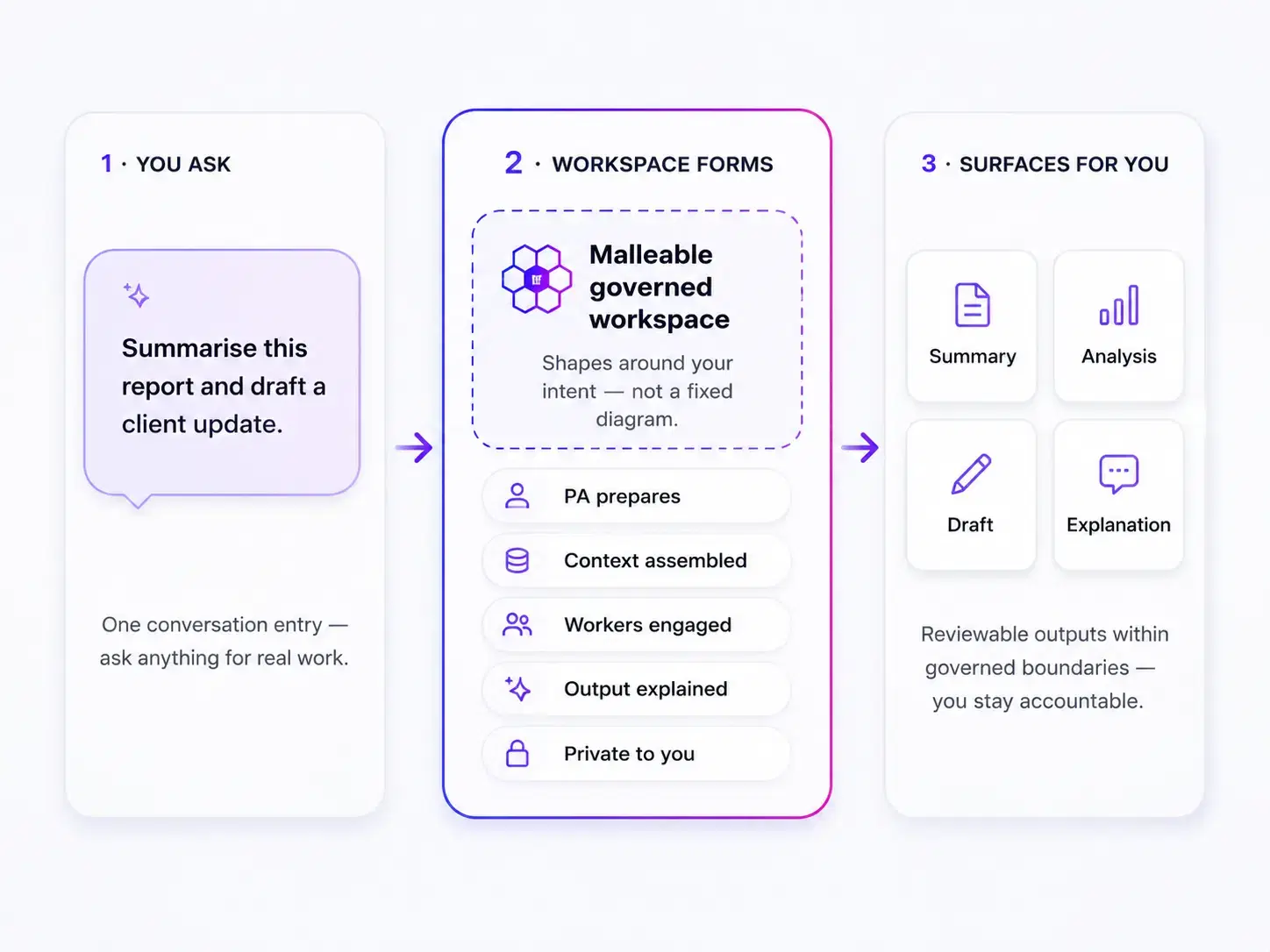
Whether you need to understand something, research an issue, prepare a document, or coordinate a task spread across people and tools — start with the need, not the architecture.
Your Personal Assistant in the workspace helps you ask, understand, research, prepare, analyse, and organise. You decide what to accept, share, or act on.
Describe your situation and what you are trying to achieve.
Research, draft, summarise, analyse, and explain — you review outcomes.
Your workspace information remains confidential.
Approvals, sharing, and consequential actions remain yours.
From a quick answer to a multi-step brief, ifCEM adapts to the task while you stay in control — with approval when work is sensitive or consequential.
ifCEM helps interpret what you are trying to achieve and clarifies when needed.
It checks policies, permissions, and context before work continues.
It drafts, analyses, summarises, or organises the task.
If something is unclear or sensitive, it asks or pauses.
If the task is allowed, it continues within approved boundaries.
For broad or unclear requests, ifCEM gathers more context before responding.
When something is missing or uncertain, ifCEM asks instead of guessing.
For clear tasks, ifCEM can draft, summarise, analyse, or organise the work.
When action is allowed, ifCEM continues within approved boundaries. If approval is needed, it pauses for review.
The right response depends on the request, context, and configured boundaries — not a single default path.
ifCEM works with your context, files, and available capabilities — not only by generating a quick answer. The assistant helps prepare and coordinate. You remain responsible for approvals and consequential actions.
Bring documents, data, and workspace context into the work — scoped to what the task needs.
ifCEM assists with preparation and coordination. It does not silently become the authority to act.
When needed, approved tools and organisational capability can be engaged — not recreated inside a model.
Less repeated explanation. Clearer preparation. You stay accountable for what you use.
Start from a real need. ifCEM helps you understand what is required, prepare the work, and bring in capability as needed — with you in control throughout.
Tell ifCEM what you are trying to achieve — in plain language. You do not need to know which system or process applies.
Your Personal Assistant helps clarify the request, gather relevant context, and prepare drafts, research, or analysis.
When required, information, documents, tools, and organisational capability can be engaged within workspace boundaries — using what you already have.
Sensitive or consequential steps pause for your approval. You accept, change, or reject what was prepared.
Optional private learning stays with you. Sharing context into governed work requires its own consent — you can opt in, opt out, withdraw, or clear retained learning at any time.
ifCEM is designed to connect to the systems, documents, and tools your work depends on — governed by workspace rules, permissions, and the task being performed.
Production vendor adapters (e.g. Salesforce, CRM, ERP) are on the roadmap — not currently available. Port and adapter contracts exist internally; live integrations require configuration.
Not every workspace sees the same tools. That is intentional.
Connect to internal systems, databases, and APIs.
ifCEM can read or use approved data sources within defined workspace boundaries.
Examples
Internal APIs, databases, line-of-business tools
Platform direction: bounded support for team conversations and collaboration — decision preparation, follow-ups, summaries, and shared context with audit records.
Platform direction examples
Slack, Microsoft Teams (not production connectors today)
Supported pattern: work with approved documents within workspace permissions — read, summarise, and reference where configured.
Illustrative patterns
Microsoft 365, Google Workspace (configuration-dependent)
Support real work, not just chat.
ifCEM can help prepare or complete approved work steps, while sensitive actions pause for clarification or approval.
Examples
Approvals, internal workflows, code repositories
Illustrative examples only — production CRM adapters are not currently available.
ifCEM may help with analysis and preparation while checking access and recording what happened when institutional ports are configured.
Roadmap examples
Salesforce, CRM, ERP systems (not production adapters today)
Add tools and workflows that fit your organisation.
New capabilities can be added without weakening governance or changing the core system.
Examples
Custom APIs, internal tools, partner integrations
Tools are made available only when they are approved for the workspace and relevant to the task.
Once usefulness is clear, control matters. AI can assist — it does not silently become the authority to act. Permissions, consent, confirmation, and human judgement stay explicit when work has consequences.
Policies and expectations often remain in documents, training and manual processes.
Configured boundaries shape how work may proceed.
Your Personal Assistant drafts, summarises, analyses, and explains while surfacing what needs your attention.
You review, change and decide what to accept and use.
For routine preparation, your assistant helps directly. When work needs clearer boundaries — permissions, policy checks, or human review — ifCEM applies governance before anything proceeds. Approved tasks use only the tools and information required. People remain accountable for decisions.
BOUNDARIES CHECKED
Permissions, policy, and context are checked before consequential work continues.
NEED STATED
What you are trying to achieve is captured in plain language.
WORK PREPARED
The assistant prepares research, drafts, or analysis within boundaries.
TOOLS USED SELECTIVELY
Only approved tools and sources for this workspace and task.
OUTPUT FOR REVIEW
Results are presented for your review — not as final decisions.
CHECKS APPLIED
Policy and permission checks run before release where required.
YOU DECIDE
You accept, change, or reject what was prepared.
NEED STATED
What you are trying to achieve is captured in plain language.
WORK PREPARED
The assistant prepares research, drafts, or analysis within boundaries.
TOOLS USED SELECTIVELY
Only approved tools and sources for this workspace and task.
OUTPUT FOR REVIEW
Results are presented for your review — not as final decisions.
CHECKS APPLIED
Policy and permission checks run before release where required.
YOU DECIDE
You accept, change, or reject what was prepared.
AI can assist. It does not silently become the authority to act.
When work may have consequences, ifCEM checks permissions, policy, and context before proceeding — and can pause for your review.
Assistance is not the same as authority to act.
Research, analysis, drafting, and validation run as approved tasks within configured boundaries — not as open-ended autonomous agents.
People remain accountable for outcomes.
Tools and data sources are engaged selectively for the work at hand — not broad access to everything in your organisation.
Minimum access. Clear boundaries.
The same need-led approach can deepen over time — from individual preparation to shared team context and discoverable organisational capability — without replacing the systems you already use.
Add new tools and business processes as your needs change.
Keep approvals, permissions, and rules in place as you scale.
Maintain visibility across every step, decision, and result.
ifCEM is available today for guided evaluation and bounded organisational pilots. Bring one real use case, see how ifCEM works through the guided replay, or explore a bounded organisational pilot. Capability matures workflow by workflow. See the Trust Centre for what is in guided evaluation today versus platform direction.
Engagement begins from your need. Commercial options are determined after fit is understood.
Use-case discovery, guided replay, and governed preparation — including workspace access for invited and approved participants.
Start with one real use case. No plan selection required.
Bring a use case to explore fit.
Shared workspaces, roles, and team context for organisations ready to extend beyond individual use cases.
Guided rollout as capabilities mature.
Organisation-wide governance, discoverable capability, and enterprise integrations — introduced progressively.
Enterprise engagement follows use-case fit.
Bring one real use case, see how ifCEM works through a guided replay, or explore a pilot for a bounded organisational use case — without public signup or plan purchase.
One approach — deepening as the work grows
You do not need to choose a product tier or audience type. Start with a real use case. The same need-led model applies whether you are working alone, preparing client deliverables, coordinating a small team, or exploring institutional capability.
Current engagement
Platform direction
Not every capability is customer-facing today. Institutional federation, universal discovery, and production vendor adapters are introduced progressively — see the Trust Centre for boundaries.